C3 Manual: Setting the shutter
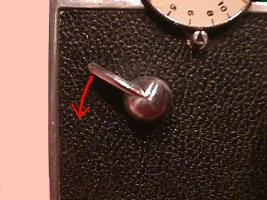
Cock the shutter by pushing down on the shutter cocking lever as shown. You are now ready to take a picture.
The
shutter speed dial (see the first reference picture) controls the
length of time the shutter is open. The numbers on the dial represent
fractions of a second -- 10 is 1/10 second, 300 is 1/300 and so forth.
Some
models have 10 shutter speeds, some have 7 and some have 5. If your
camera has 5 numbers and they are 4,5,6,7 and 8, you have a Matchmatic
C3. The numbers correspond to the following settings on a standard C3:
4 = 10 (1/10)
5 = 25 (1/25)
6 = 50 (1/50)
7 = 100 (1/100)
8 = 300 (1/300)
To
set the shutter speed, turn the shutter speed dial counterclockwise (to
the left) until desired shutter speed is opposite the index mark. The
extra force it takes to move the dial onto the 1/10 second setting (and
1/5 second on older models) is normal.
The bulb and
instantaneous setting knob around the shutter release (see the second
reference picture) must be on "I" when using shutter speeds on the
shutter speed dial (normal picture taking).
The only time you'll
set the bulb and instantaneous setting to "B" is if you want to take a
time exposure. With the knob set on "B", the shutter will open when you
push down on the shutter release, and remain open until you let up on
the shutter release. Use a tripod or other steady support if you take
time exposures.
Use the higher speeds (1/100, 1/300) in bright
light. If you are taking pictures of moving subjects, try to use 1/300
if there is enough light. Use a tripod or other steady support if you
use any speed between 1/5 and 1/30 second.
<--
Previous: Focusing |
Back to C3 User's Manul Index |
Next: Aperture -->
